You can download short tutorial on how to use the StyleRef field in Microsoft Word.
The StyleRef field can be used to work around some limitations in Word since styles are far less fragile in Word documents than are bookmarks. The primary use of the StyleRef field is to provide headers and footers that summarize the contents of a page. Sometimes they are used with the \l switch to provide phone-book style headers/footers which list both the first and the last occurrence of a style.
Are you trying to get dictionary style fields (Krofta - Lamb) listing the
first and last entry on your page?
If that is what you are trying for, the following will work:
Put your last name field (or whatever it is you are trying to capture) in a particular character style in your primary merge document. In the header/footer use
two STYLEREF fields with an optional switch on the last one to tell it to search from the bottom of the page instead of the top. STYLEREF fields probably don't show up in the mailmerge toolbar.
Insert => Field... => Links and References (left window) => STYLEREF (bottom of right window) => Options (button)
Look in help for "dictionary-style headers."
You can name the character style anything you want and it should be based on your default character font with no changes. You are using the style as a tag rather than as a way of formatting. Remember, this new style is a character style rather than a paragraph style.This is especially useful when you have something on the first page of a document which, if changed, should be reflected in continuation page headers or footers. Examples: the addressee name, the subject, the date. Useful StyleRef Field Tricks - Suzanne S. Barnhill, MVP
If you are doing this in a mail-merge, you may have to insert the header after you do the merge. Try inserting it before you do the merge, if that doesn't work, then try after. (I haven't tried this with a mail merge but it should work. After you get results, please share them by letting me know so I can update this.
Using the STYLEREF Field and Styles instead of Bookmarks and Ref fields
{ StyleRef "MyStyle" } instead of { Ref "MyBookmark" }
If your have a single word or a phrase in a document marked in the character style "MyStyle" that word or phrase will be reflected in this field's results, instantly. This updates in headers and footers as well as in the body when the marked text is changed. It is much more robust than bookmarks which are easily deleted by accident. See Letterhead Textboxes and Styles Tutorial - two page Word document demonstrating StyleRef and Author fields, among other things.
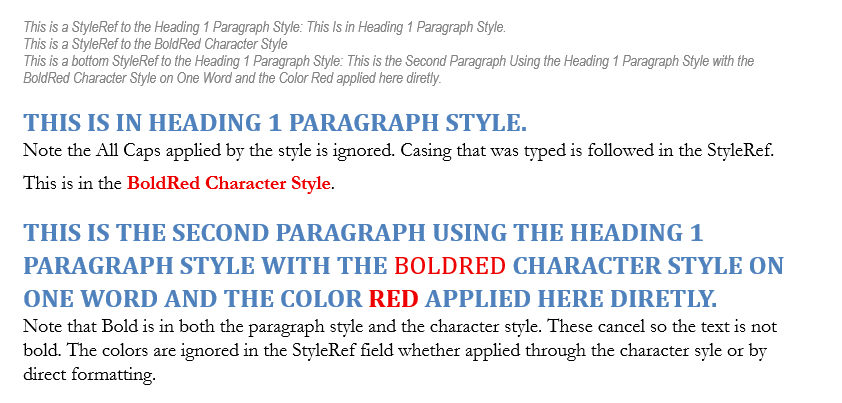
Either a character style or a paragraph style will work with the StyleRef field. The style does not have to change any formatting - it can just serve as a marker for the field. In the tutorial the styles used do have formatting functions as well -- primarily the paragraph spacing and the designation of the following style.
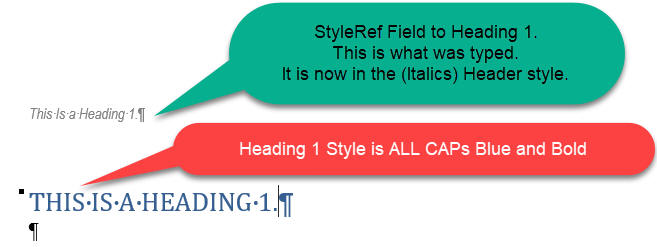
The StyleRef field, like the TOC field does not repeat any formatting from a paragraph style used for the original text; that includes ALL CAPS or Small Caps formatting. It picks up the text that was actually typed in the reference style.
A secondary use is within the document itself when you want to include text from a heading (or other style) elsewhere in the document and want that text to change depending on the heading.
See also Useful StyleRef Tricks by Suzanne Barnhill.
download the StyleRef Field Tutorial
download the Letterhead Textboxes and Styles Tutorial
Go to
Web
Resources for Microsoft Word
The up-to-date version of this FAQ
may be found at: http://www.addbalance.com/word/index.htm
 Return
to Frequently
Asked Questions List
Return
to Frequently
Asked Questions List
Go
to Microsoft Word Downloads
page
 Go to
Go to
Intermediate
Users' Guide
to Microsoft Word
(formerly Supplemented Legal Users'
Guide)
Information
about books on Microsoft
Word


(Intermediate
Users' Guide) - - - - - - - - - - - - - - - - - - - (Questions
List)