A (Global) StyleSheet in Microsoft Word
Global Templates work very well for sharing most kinds of customizations in Word. The big exception is styles. Styles contained in global templates are ignored by documents. Use of [Quick] Style Sets can be helpful but they have certain limits.
A macro, though, can be used to copy styles from a global template to the active document. A sample global stylesheet template with this macro can be downloaded from my download page.
What follows is first a macro to copy all styles from a global template to the active document.
Sub StylesCopyAllMacro()
'
' StylesCopyAll Macro written by Charles Kyle Kenyon 14 November 2001 revised 12
January 2020
' Copyright 2001, 2020 All rights reserved
' Copies all styles from stylesheet global template to active document
' http://www.addbalance.com/word/stylesheet.htm
'
' Declare variables
Dim i As Long ' Counter 1
Dim rResponse As Variant 'vbMsgBoxResult in Word 2000 or later
' Error Handler set
On Error GoTo NoDocument 'In case called when no document is open.
' If any other errors, continue on
On Error Resume Next
' ======================================
' Check to see if user really wants to do it. This section can be commented out
if you want.
rResponse = MsgBox(Prompt:="This command redefines your document's
styles." _
& vbCrLf & "Are you sure you want to do this?" _
& vbCrLf & vbCrLf & "If you are not sure, answer 'No' and
make a backup of your document." _
& vbCrLf & "Then run the command to copy the styles again.",
_
Title:="Are you sure you want to redefine your styles?", _
buttons:=vbYesNo + vbExclamation)
If rResponse = vbNo Then Exit Sub
' End of check ===========================
' Copy all styles from this template to all to Active Document
' ThisDocument is the holder of the code as well as the styles
'
For i = 1 To 3 ' copy styles three times to maintain linkages
' May not need 3 times
ActiveDocument.CopyStylesFromTemplate (ThisDocument.FullName)
' Jay Freedman
Next i
StatusBar = "All styles copied."
MsgBox Prompt:="The styles from " & ThisDocument.Name & " have been copied to your document."
On Error GoTo -1
Exit Sub ' Skip error handler routine
NoDocument: ' Error Handler - Will be called if there is not an open document
MsgBox Prompt:="Sorry, this command is only available when you have a
document open.", _
Title:="No document open!", buttons:=vbExclamation
End Sub
What follows is a more elaborate macro to copy the style Body Text and Heading Styles 1-9 from a global template to the active document. If there is no document open, it will generate a message box. This uses the OrganizerCopy method which takes a bit longer.
Before copying the styles, the macro asks whether the person is sure that he/she wants to redefine the styles. If "yes", then it will copy the styles using the Organizer. If no, it exits.
Sub StyleCopyMacro()
'
' StyleCopy Macro written by Charles Kyle Kenyon 14 November 2001
' Copyright 2001 All rights reserved
' Copies select styles from stylesheet global template to active document
' http://www.addbalance.com/word/stylesheet.htm
'
' Declare variables
    Dim sThisTemplate As String
    Dim sTargetDoc As String
    Dim i As Integer ' Counter 1 - use for copying styles three times
    Dim iCount As Integer ' Counter 2 - use to loop copying of heading styles
    Dim rResponse As Variant ' can be vbMsgBoxResult in Word 2000 or later
' Error Handler set
    On Error GoTo NoDocument ' Call when no document is open.
' Define This Template and Target Document variables
    sThisTemplate = ThisDocument.FullName ' name and path of global template
    sTargetDoc = ActiveDocument.FullName 'generates error if no document open
' If any other errors, continue on
    On Error Resume Next
    rResponse = MsgBox(Prompt:="This command redefines your Body Text Style and" _
        & vbCrLf & "Heading Styles 1-9. Are you sure you want to do this?" _
        & vbCrLf & vbCrLf & "If you are not sure, answer 'No' and make a backup of your document." _
        & vbCrLf & "Then run the command to copy the styles again.", _
        Title:="Are you sure you want to redefine your styles?", _
        Buttons:=vbYesNo + vbExclamation)
    If rResponse = vbNo Then Exit Sub
    ' Copy Body Text and Heading Styles to Active Document
    ' Note that this requires exact style names
    For i = 1 To 3 ' copy styles three times to maintain linkages
        With Application
            .OrganizerCopy Source:=sThisTemplate, _
                Destination:=sTargetDoc, Name:="Body Text", Object:= _
                wdOrganizerObjectStyles
            For iCount = 1 To 9 'Copy heading styles 1-9
                .OrganizerCopy Source:=sThisTemplate, _
                    Destination:=sTargetDoc, Name:= _
                    "Heading " & iCount, _
                    Object:=wdOrganizerObjectStyles
            Next iCount
        End With
    Next i
    Exit Sub ' Skip error handler routine
NoDocument: ' Error Handler - Will be called if there is not an open document
  MsgBox Prompt:="Sorry, this command is only available when you have a document open.", _
    Title:="No document open!", Buttons:=vbExclamation
End Sub
End of procedure (macro). (I didn't say it would be easy, just that it could be done!)
For instructions on copying this macro into your own template, see Macros and VBA or Installing Macros. Otherwise, the sample template already has it installed. It also uses the keyboard shortcut Ctrl+Alt+Shift+2 (Ctrl+Alt+@) to run the macro.
Additional Thoughts - [Quick] Style Sets
The best place for styles is in the document template rather than in a global.
Ribbon versions of Word also have the ability to use Themes and [Quick] Style Sets. These should make unnecessary the use of the macro in a global template for most styles. I urge you to look into using those. Quick Style Sets, though do not hold or transfer Table styles. Including numbering in such a set is not simple and not doing it right can lead to unstable numbering. An alternative to Table styles is the use of Quick Tables which are building blocks and can be stored in a global template.
An alternative would be to have a separate stylesheet residing in a predetermined place on the system, possibly in a folder in the Workgroup templates folder. Then use the Organizer to copy styles from that stylesheet. This would have the advantage of being able to have multiple style sets available using the same style names.
It is expected that the macro would be attached to a QAT icon (Word 2007+) or a menu command (Word 2003 and earlier) in the global template under the Format menu. It could also be called as part of the AutoNew macro in particular document templates to pull in or refresh styles in those document templates. The sample template has the Heading Styles set up as cascading, that is, one based upon another in traditional Outline numbering style. Also included are three [Quick] Style Sets that are set up in legal-style, outline-style, and contract/agreement-style numbering.
It is important that you understand how styles interact with one another and with Word's other features. The macro given here copies the Body Text style as a base style. In the template it is taken from the other styles all base their font on Body Text. If the styles being copied are based on a built-in or existing style which is not copied, you may end up with unexpected results. You can also end up with desired results; sometimes you want the formatting in the document to be very different from the formatting in the global template, if that makes it fit into the document better. It is up to you, as the crafter of the template, to make sure that if your user is surprised by the results, it will be a pleasant surprise.
If you want the copied styles to not be affected by any style definitions already in the document and to not effect text already in the document, you would want your copied styles to (1) not be based on any built-in style (including "normal") and (2) to not have the same name as any style already being used in the document.
See Understanding Styles in Microsoft Word for more on styles. You may also want to take a look at the StyleRef Field Tutorial, the IncludeText Field Tutorial, and the Letterhead Textboxes and Styles Tutorial for a better idea of how styles can interact with each other.
Again, look into using [Quick] Style Sets and Themes. See also: [Quick] Style Sets and Word Themes in Microsoft Word.
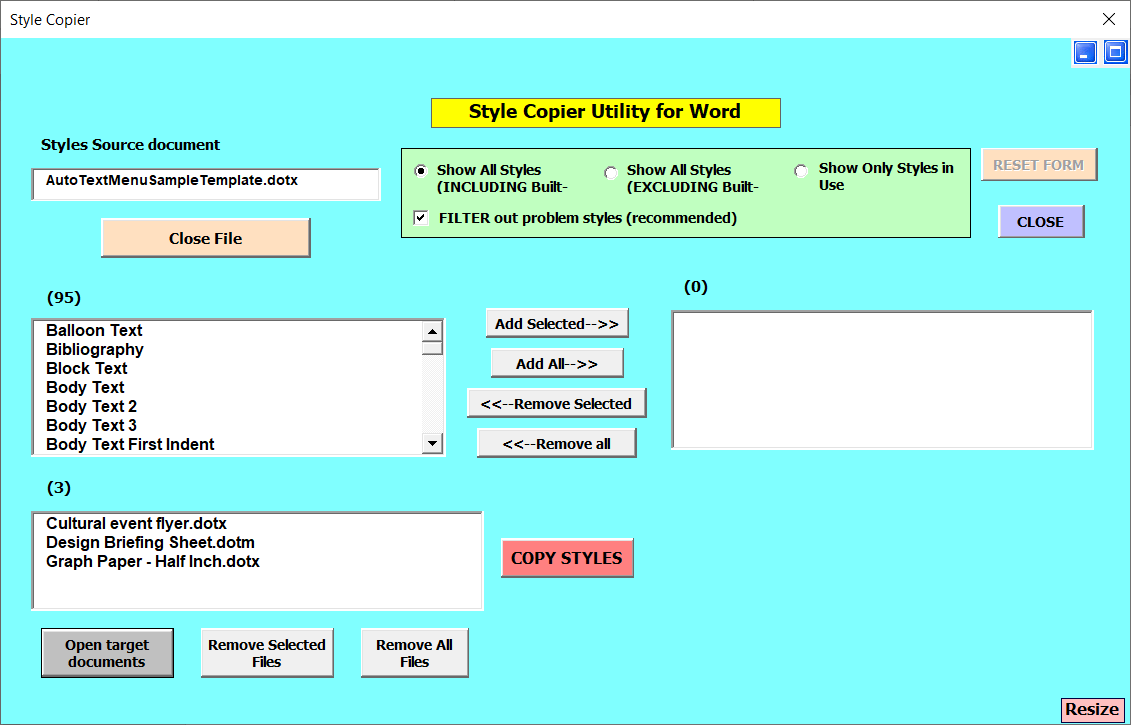
See also Style Copier by Paul Edstein (macropod) MVP