See also:
How can I
change the default font from Times Roman New 10pt (12pt) to something
else?
This page last revised: 19 Feb 2026 11:59:14 -0500 .
 | Word 2003 and earlier versions |
| Word 2007 and later versions |
| What if you have followed these steps and next time you open Word you are back before you made the changes? |
Word 2003 and earlier versions
Note, changing the default font changes not just your regular text, but what appears in tables, labels, and other Word features.
Here we'll discuss two methods.
1) Changing the default font, only.
Create a new document. (File > New)
Call up the Font dialog box:
Format > Font
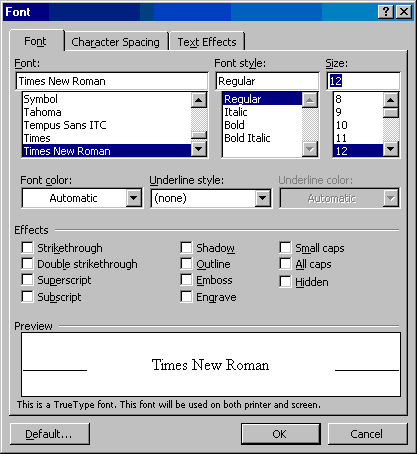
set your preferred font and click on the "Default" button (lower left of dialog box).
This is easiest method but is not complete. It is the method recommended by Microsoft in their Knowledge Base at: http://support.microsoft.com/kb/291291
2) To complete your change you should change the beginning style. To do this, open the Normal.dot template either from within Word or if in Windows, right-click on Normal.dot and select "Open."
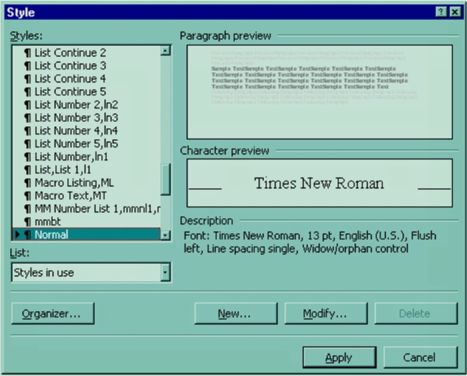
Open the Style dialog box - Format > Styles... (or in Word 2003, open the Styles Pane)
and choose the Body Text style. See What is the Difference Between the Normal Style and the Body Text Style?
Click on the Modify button.
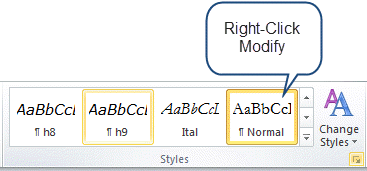
In Word 2007 and Word 2010 you can find the style in the Gallery and right click on it. See below.
Where it says "Based On" Normal scroll up to the top of the list where it says (no style).
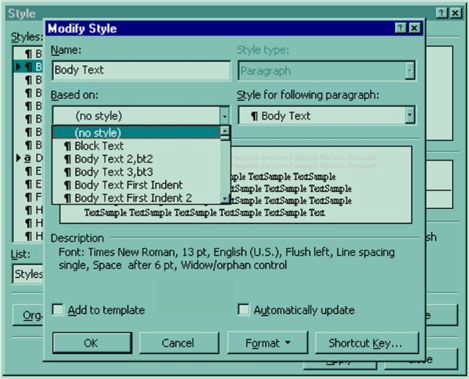
Change the Font to what you want
(Format (button) > Font)
Change the language back from (no proofing) to English (or whatever your language)
(Format (button) > Language).
Set up your default paragraph formatting (space before, indents, tab settings, etc.)
(Format (button) > Paragraph).
Click on the OK button. Click on the OK button (different OK button).
Click on the Apply button. (This makes the style your beginning style in new Word documents based on this template.)
Type the letter "a" or any character and then press backspace to delete what you just typed (forcing Word to recognize that you have changed Normal.dot). This is different from UnDo!
Save and close Normal.dot.
The first method is quick and easy. The second method will make it much more likely that if you give your documents to someone else that they will see what you sent them. (In my opinion) typing in normal style and basing styles on the normal style make for much confusion in transferred documents (especially if those styles are set to update from the template upon document opening).
For more about styles, see Understanding Styles at http://www.addbalance.com/usersguide/styles.htm. For more about the Normal.dot template (and other templates) see Template Basics at http://www.addbalance.com/usersguide/templates.htm.
See also: Default Paragraph Font Explained by Suzanne Barnhill, MVP
Note that if you want your tables and labels to have something different from your default style, you may need to apply the normal style to them directly.
Word 2007 and later versions
Note, changing the default font changes not just your regular text, but what appears in tables, labels, and other Word features.
1) If you do not have a document open, create a new document that is based on the Normal.dotm template.
To do this, click the Microsoft Office Button (File Tab), click New in the New Document task pane, click Blank Document, and then click Create.
In the Font group, click Fonts. Select the font, the point size, and any attributes that you want in the Fonts dialog box.
Click Default.
Click Yes when you receive the following message: Do you want to change the default font to font name? This change will affect all new documents based on the NORMAL template. Click OK.
Click the Microsoft Office Button (File Tab), and then click Word Options.
In the Customize tab, select Commands Not in the Ribbon in the list, and then select Save All.
Click Add, click OK, and then click Save All in the customized Quick Access Toolbar.
Note If Word prompts you to save the new blank document, click Cancel.
If you did not Save All, you should be prompted about saving changes to the default template when you close Word. If you are not prompted for this when you close Word, you should be. See Save Changes to the Global Template? Keeps Popping Up.
This is easiest method but is not complete. It is the method recommended by Microsoft in their Knowledge Base at: http://support.microsoft.com/kb/291291
2) To complete your change you should change not only the default font but also the default style.
To do this, open the Normal.dotm template either from within Word or if in Windows, right-click on Normal.dot and select "Open."
Open the Styles Pane. In the Styles gallery on the Home Tab press the display button in the bottom right corner of the Styles Gallery.
Choose the Body Text style. See What is the Difference Between the Normal Style and the Body Text Style?
Right-Click on that Style and choose Modify.
Where it says "Based On" Normal scroll up to the top of the list where it says (no style).
Change the Font to what you want
(Format (button) > Font)
Change the language back from (no proofing) to English (or whatever your language)
(Format (button) > Language).
Set up your default paragraph formatting (space before, indents, tab settings, etc.)
(Format (button) > Paragraph).
Click on the OK button. Click on the OK button (different OK button).
Click on the Apply button.
Type the letter "a" or any character and then press backspace to delete it (forcing Word to recognize that you have changed Normal.dotm). This is different from pressing UnDo!
Save and close Normal.dotm.
The first method is quick and easy. The second method will make it much more likely that if you give your documents to someone else that they will see what you sent them. (In my opinion) typing in normal style and basing styles on the normal style make for much confusion in transferred documents (especially if those styles are set to update from the template upon document opening).
For more about styles, see Understanding Styles at http://www.addbalance.com/usersguide/styles.htm. For more about the Normal.dotm template (and other templates) see Template Basics at http://www.addbalance.com/usersguide/templates.htm.
Note that if you want your tables and labels to have something different from your default style, you may need to apply the normal style to them directly.
See also: Default Paragraph Font Explained by Suzanne Barnhill, MVP
See also Page Setup Dialog.
What if it doesn't work? What if you followed the instructions but next time you open Word you are back at the beginning?
If you can't save these changes, chances are that you either (1) are on a network with network policies that keep you from making changes to normal.dot or (2) you have poorly-written Add-Ins on your computer. Both of those are beyond the scope of this page. See Add-Ins in Microsoft Word.
If in a Ribbon version and the changes to the normal style seem to apply some times and not others...
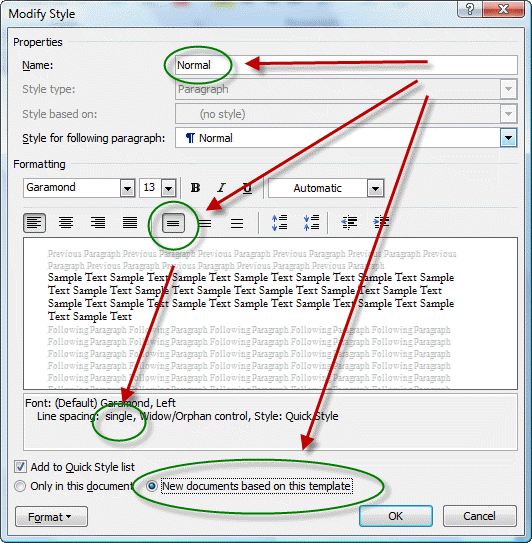
Word 2010: "There's another way of changing the defaults in Word 2010. Click on the dialog launcher (arrow in lower right corner) of the Styles group to open the Styles pane. At the bottom of the pane are three square buttons. The one on the right is labeled (when you hover the mouse) "Manage Styles". Click that button. Then click the tab labeled Set Defaults. Choose the font, font size, line spacing, etc. which you prefer. Make sure that the option button labeled New documents based on this template is selected. Click OK. Normal style is based on these default settings, so Normal style will inherit what you set here. So will other styles such as footnotes, endnotes, etc. If you change only Normal style, especially if you change the font from Calibri to Times New Roman, you might be surprized by Calibri popping up here and there. That will not happen if you set the font through Manage Styles. The same is true for line spacing.
"In the Set Defaults tab, you'll notice that the font is +Body. This relates to Office Themes, a feature which is worth learning a bit about. If Themes don't interest you, change the font to Times New Roman, or whatever you prefer."
The above comment on Word 2010 is from Richard Barrett on Woody's Lounge (now Office Secrets). As far as I know, it applies to all Ribbon versions of Word.
Note, if you change from +Body or +Heading, you may be divorcing your settings from Document Themes and/or Style Sets. I confess ignorance on this. Suzanne Barnhill gave some guidance in this forum post:
"The font for many styles in Word (unless you change it to a specific font) is defined as being either the Body font or the Heading font. This is determined by the theme. If, instead of assigning a specific font to a style, you choose Body or Heading, then if you apply a different theme that uses different Body and Heading fonts, your styles will change automatically. You still define the font size and other properties (Bold, Italic) in the paragraph style, but the font itself can be variable. If you want only specific fonts for the styles (and this would especially be true in a template that used more than two fonts), then you can define them in the template styles; they would then not change if you applied a different
theme (though some other elements, such as colors, might).
"You can see how this works (with Live Preview) by selecting a document that has both headings and body text in it and then hovering over the various theme font sets" ...
The up-to-date version of this FAQ may be found at:
Download this FAQ in Word 97 format
Changes / suggestions / ideas can be sent to Charles Kenyon.
views since28 August 2001.