
Scope: Office troubleshooting (written for Word but applies to Excel and PowerPoint)
Level: Beginner
Note: This is an Article that was created on the Microsoft Answers site that I saved so it could be edited. Despite appearances, it is not on a Microsoft site, now.
You have been asked to submit a sample document or file to assist with troubleshooting your issue. Why? How?
There
is an old saying that a picture is worth a thousand words. Sometimes
screenshots can help as well so we can see what you are seeing, yes. How to include a screenshot in your post
However, if a screenshot is worth a thousand words, an actual file may be worth ten thousand! Word and other Office programs have a multitude of methods that produce the same or very similar appearances on the screen. The actual file gives us a chance to look at the actual styles, and settings in the document. Some here delve into the underlying XML structure of a file when it is needed. None of that information is available with a screenshot and it may be crucial in helping you fix your problem or achieve your goal.
To try to help you, we need to figure out what is going on in the document (file).
We do not want your private information.
We do not want you to share confidential or proprietary information on this very public forum.
We do want to take a look "under the hood" though to diagnose your problems.
Dropbox works as well for sharing.
When you have your answer, if you want you can remove your file from OneDrive or DropBox
Creating a document that does not share confidential, proprietary, or private information.
You can use the Rand or Lorem function in Word to create "dummy text."
The rand "virus": or how to insert dummy text into a document by Suzanne Barnhill, MVP
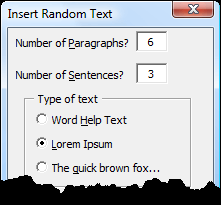
I've even created an Add-In to let you do this without remembering how to use the function: Random Text Add-InYou can use a macro to replace the text in your current document with random text. My fellow author Rohn007 has pointed out this one from Office Watch: Replace Confidential Text With Filler Text
For Excel data, see below.
This user-to-user support forum's heavy lifting is done by volunteers. When we try to recreate your problem numerous assumptions and guesses have to be made, often resulting in back-and-forth question and problem-solving stretching over days. You can get faster and better answers by supplying a sample.
The sample should clearly show the problem you are experiencing. You may need to start it with a couple of paragraphs saying where we should look for the problem.
It should be fairly short. Usually a few pages is all that is needed. We do not need you to post your thesis or book online to troubleshoot.
From Rohn's page: Trouble Shooting - Share OneDrive File
Excel Macro to Randomize Selected Data
.
A macro by Andreas Killer to anonymize data in selected cells can be downloaded here:
https://www.dropbox.com/s/rkfxuh85j5wyj9y/modAnonymize.bas?dl=1
.
The download is a .BAS file. You can open it in any text editor to view the code.
Andreas's instructions for using the download:
Open your Excel file
Right-click on the sheet tab
Choose "View Code"
Press CTRL-M
Select the downloaded file and import
Close the VBA editor
Select the cells with the confidential data
Press Alt-F8
Choose the macro Anonymize
Click Run
.
This article shows 2 ways to load the macro code in a .BAS file
https://www.techwalla.com/articles/how-do-i-import-macros-for-excel
[end of quoted material]
I have been advised by Excel experts that DropBox is preferred. "Do not use OneDrive because we need a 1:1 copy!"
Sharing on DropBox or OneDrive:
You need to have one of these set up on your computer. Both offer free accounts.
Here are help pages on how to use these for file sharing:
OneDrive (included with Microsoft 365 but available without a subscription for free)
Share OneDrive FilesDropBox is a competing service that also offers free accounts
Create and Share DropBox links with View-only access
Share Any File In Your Dropbox Account With Non-Dropbox UsersAgain, I suggest a share link that allows viewing but not editing online
Note: make sure to upload to your Personal (consumer) OneDrive rather than your work OneDrive or SharePoint. Files in the Work cloud can be hard to share due to security restrictions placed by the work admins. (From Rohn)
VBA and code problems
If you are asking about a problem with a macro, provide the macro in your question and in your example document.
Here is a page in the Stack Overflow forum on what to provide when you have a problem with a macro:
How to create a Minimal, Reproducible Example - Help Center - Stack Overflow