

Note: This is an Article that was created on the Microsoft Answers site that I saved so it could be edited. Despite appearances, it is not on a Microsoft site, now.
People have written that they cannot make the Ribbon show completely. This article is intended to help with that.
I already have an article on Minimizing Ribbon / AutoHiding Ribbon / Toggling Toolbars which addresses some of this.
I've created a free, macro-free, Add-In that adds this button  to the QAT. It can be downloaded from my downloads page:
Collapse the Ribbon Control on QAT Add-In
This is different in different versions of Word.
Recent versions have this option, checked by default. Uncheck it if you want your Ribbon displayed. Earlier versions did not have this setting.
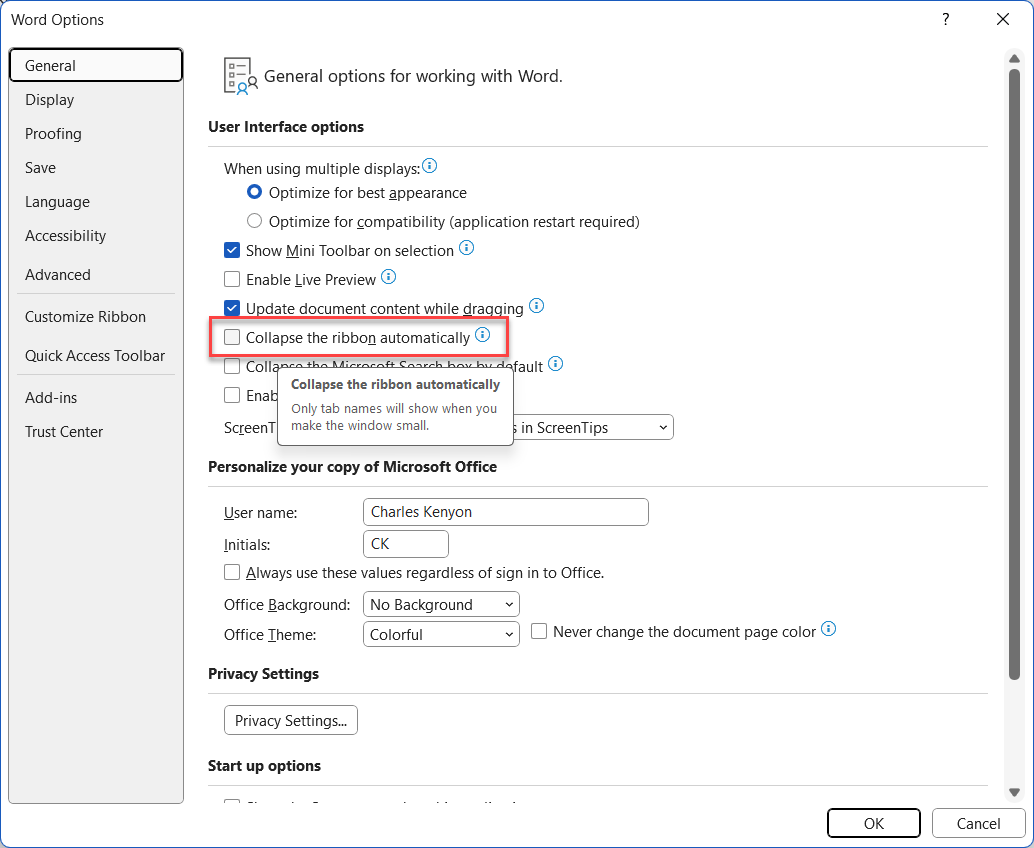
Typically, the Ribbon tabs (names) are displayed.

Clicking on one of those will display all the controls on the Ribbon.

Unless you have the option checked to automatically minimize the Ribbon, you can double-click on one of the tabs and it should stick.
When you close Word, you must have only one document open and it must have the Ribbon displayed.
If the top of your document looks something like this...

You have Full-Screen mode implemented, you will not have access to that drop-down and you need to use the Alt key or the three dots in the upper right to display the Ribbon. You then have access to the drop-down. Choose Always show Ribbon or Show tabs only.
This is the drop-down available under "New Experience"/"Visual Refresh Preview" on the right end of the Ribbon.
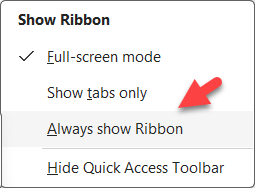
Also, make sure that Hide Quick Access Toolbar is not checked!
For more about "New Experience"/"Visual Refresh Preview" see this article: New Experience/Visual Refresh Preview - Microsoft Office - Microsoft 365 - Turning it On and Off
If you are seeing the three dots in the top right, but not the Show Ribbon control, you are stuck in Full Screen mode.
See my parallel article: My Ribbon is gone - I have three dots on the right that I can click to see it, but then it disappears again. - solution
If you are not seeing the tabs at all, see my other article: Minimizing Ribbon / AutoHiding Ribbon / Toggling Toolbars Compared - Microsoft Community
